Showing posts with label Virtual Worlds. Show all posts

Saturday, November 23, 2013

Am under the weather this week.

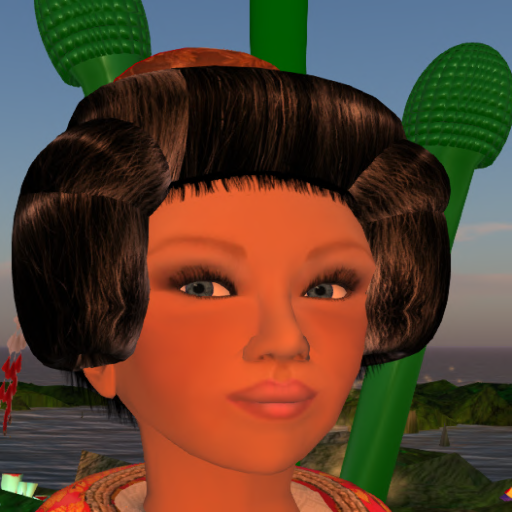
Been fighting a cold this week and that may be a good thing if I am well for the holidays. I start with a continuation of my last post-http://slbiology.blogspot.com/2013/11/new-clothes.html. At any rate when I rated Hosoi at Kitely's market place last week, I jokingly mentioned that the only thing missing was some nice hairpieces to go with my new Kimono. Well Amiryu Hosoi saw my post and sent me some nice hair pieces. Here I am complete with a new hair piece to go with my wonderful Kimono.


The green things in the background are not part of the hairpiece but large horsetails growing in my Kitely world.

 Today I spent a quiet afternoon building in Kitely so here are some shots of my home in various stages of completion, also showing some views of my world.  Not done yet but made a good start.


 This is a sleeping meditation loft.
Decided I needed a balcony off of my loft.


Now that I have more stuff up I want to see what happens when I make an OAR file for local use with New World Studio. I should at least get my created objects...we shall see.


Thursday, August 8, 2013

A Tide Pool in Kansas?

Ocean life has always held a fascination for me, something I suspect is not uncommon among those of us who end up as biologists. My mother gave me some of Rachel Carson's books, the The Sea Around Us, The Edge of the Sea and several trips to Cape Cod imprinted the smells, sites and creatures of the sea. So of course as part exploring Blender and mesh had to make something with tentacles. I didn't think I was ready to tackle squid or octopuses so decided on sea anemones. Easy enough right...well it took 2 days to get something that looked sort of like a sea anemone.

Here are three of my attempts. My first attempt is on the left and my latest attempt is on the right.


 The first attempt was not meant to be realistic and I had all sorts of trouble with painting the seams out. Both the second and third attempts are more realistic, which ironically was easier than what I tried to do in my first attempt.  The tentacles were done using extrude, scale and translate tools in the mesh editor. There are I think other ways to do tentacles but I decided to stick with the the tools I best understood. The last one is still has some seam issues but pretty minor.

Of course I had to make my own little tide pool. Which resides some where in the cloud or mirrored to my home machine, alas in-silico.

Friday, August 2, 2013

Playing with Light

Today I visited Paislee Myrtle's Dragon's Teeth site which is a wonderfully lit world as shown here:


This led me to do some lighting in Simone's World. Here is the result which is not nearly as well crafted as her world but I had fun with this.


By the way she is in a group called the Devokan Story Tellers. This link is to her Kitely World Page. http://www.kitely.com/virtual-world/Paislee-Myrtle/Dragons-Teeth

This world is free to visit and lots of the materials are copy-able. In fact I could not resist the group of fern fiddleheads just to the left of where I am in the second picture. 

My Kitely World is still not open for visitors...so you can't see my experiments with OpenSim physics or me accidently donning a giant orchid.

More about the Devokan Story tellers is at Danko's blog: http://journeymetaverse.wordpress.com/devokan-storytellers-page/

Tuesday, July 30, 2013

Building is Theraputic


Slowly my Kitely world is taking shape as I get better at using Blender.  Just about very object in in this view except for the blue landing pad is made from mesh. The little purple flowers were actually pretty challenging for me though I am sure more proficient people could probably make these much more easily than I currently can. You can just make out a pink bridge that I threw together yesterday...OK so it did take me an hour to figure this out.

Here is a better view of the bridge:


Saturday, July 27, 2013

Framework for a tree

Yesterday I decided to try something a bit more ambitious in mesh-namely to make a tree with blender. So I started with an isododecahedron sphere and uses a series of selects, extrusions, and rotations came up with this framework. I didn't texture it but simply added a reddish material since I was more curious as to how well something like this would be handled in Open Sim. No problem as it turns out.


Here is my tree's framework on my Kitely test site.  Hopefully I can get to the leaves soon.

Sunday, July 21, 2013

Morning Glories in Mesh

I've actually managed to figure out enough about Blender and mesh to put these morning glory-ish flowers together today.

Friday, July 19, 2013

Adventures with OpenSim

At various times I have dabbled with OpenSim but in the past kept returning to Second Life but I have been taking a second look now that Open Sim has matured. First of all it is now really possible to have your own private world and I plunked down the $20.00 for NewWorldStudio's OpenSim generator. It has bugs being still in beta, but Hey I have my own private World for 20 bucks with 100,000 or so prims as opposed to my region in SL which costs 40 bucks a month.

I still haven't figured out how to link my private world to other grids-NewWorldStudio's connectivity test shows it as public but since I use this region to experiment with mesh and physics...well maybe I don't want any visitors just yet. But I did learn about OAR files. More on that in a bit.

Speaking of mesh-finally a reason to learn a bit about Blender. I have used sculpties but found trying to do them in Blender a bit temperamental so ended up using one of the SL tools for doing sculpties. So on to mesh. I like doing mesh but one nut that I hadn't cracked in a couple days of scratching was how to how to get the textures to render in the dae files that Blender exports and SL and Open sim support.  I had to grasp the concept of materials and also didn't notice the little check boxes in Blenders .dae export menu relating to exporting textures as well....duh.

One development I really in pleased with the Kitely. I had read about this company and its new business model and really low rates...so I plunked down money for their Bronze plan. Gives me a free region and costs 5 bucks a month. OK 5 bucks a month is definitely better than 40 bucks a month for what, an 8th of a region? Plus getting back to OAR files for just pennies I could upload an OAR file and even better can modify the terrain! How cool is that. That world is private for now. I can go public for 20 bucks a month...still a lot better than SL for the money.

Oh and it gets even better! Imagine my delight when I exported my world's OAR to my home machine and loaded it into OpenSim using NewWorldStudio and was able to watch my NWS World take shape in my viewer. How cool is that!  Now if I could only use a common AV look across all Worlds...At any rate the picture shows me in the NWS version of my Kitely World. One giant sandbox. Presumably I can go the other way as well but haven't tried that yet.

Saturday, July 23, 2011

An Alternative to Second Life?

Somehow I keep getting side tracked. Today I stumbled upon a new virtual world grid based on open sim called Avination and of course checking this out took precedence over cleaning and reorganizing my study.

Avination according to its website was started by an OpenSim developer, Melanie Thielker who has created her own "spin" on Open Sim. See https://www.avination.com/inside-avination/management-team.html for more information about Avination's Staff.

Now I have invested lots of time and energy in Second Life, including on my college's land. Unfortunately Second Life has doubled educational fees for a ful sim to around $4,000 which has my IT people really nervous. Avination right now is advertising full sims with 15,000 prims at the special price of $60.00 a month. Hmm in SL I am at the $40.00 tier level which means I am paying about 6 times what I could be paying in Avination.

Well even a virtual lady can't resist a bargain so I went on over. Joining is easy and similar to Second Life in that you choose your own first name and then select a second name from a predefined list and select your basic avatar form. One slick thing is that Avination has terminals in Second Life. (Wonder if Linden Lab knows about this.) You can go there and use the terminal to assign your Second Life AV name. Which I did right away. You don't get to share your inventories or your appearance but when you log back in to Avination your SL profile name shows in place of your Avination AV name. The system is like SL's new double naming system so my Avination name still shows on my profile if you click on the Avatar.

You can use SL viewers for Avination but I choose to use the Avination viewer. This viewer is clearly based on the SL viewers but is a lot more like the older 1.2 series of SL viewers wth some things out of SL 2.X viewers. Just about everything should be familiar to veteran SL users. I have not had a chance to try any scripting but Open Sim's version of LSL typically has some things on it that are not found in SL's language so I would be suprised if all my scripts will always work.

Buying land. Unlike SL it looks like the best thing to do is buy a whole sim. In fact the map is set up as a huge grid and you pick your sim and which one of a limited number of configurations you want and buy the sim using one of several methods including Paypal.

The advertisements have a promotional code so you might watch out for that. A sim is $40.00 a month for the first three months and then goes up to $60/month. Mmmm sounds to good to be true even at $60 a month but the lure of the bargain was too strong so I am giving it a whirl. I am sure there are some limitations in terms of flexibility and service...we shall see. Supposedly I can port my SL objects to Avination-assuming I have permissions on the objects so we shall see. Probably can't port my nice Kimono collection though.

I had my sim within 5 minutes of the transaction. Seeing all that sunny empty land is a bit intimidation as I have always lived in the mainland in SL. By the way there is apparently no sort of division between PG, Mature and the "Dark side" but you can control access to your sim just as in SL. So I figure at $40 bucks a month for three months this is worth a try.

One risk is that this is a small company-when I was on there were about 850 users online (SL might have 60K users online at the same time) so that perhaps adds a bit of premium to SL. Avination has it's own currency(C$) I haven't compared it closely, but it looks to be valued roughly the same as the Linden. I bought 2,000 C$ for $8.00 so I can upload textures and files. Uploading costs are 10C$ per upload.

I am not ready to give up my SL account so you still find me in Carmine at http://maps.secondlife.com/secondlife/Carmine/137/181/144

More to come.

Tuesday, February 23, 2010

SLPro Conference Day 1: A Rocky Start but...

The key note got off to a rocky start with most participants not able to get audio and video for much of the time. But the big announcment is SL's Viewer 2 which we get to preview! Looks like a cleaner interface and my impression is that Viewer 2 renders graphics more rapidly than the current viewer.

But what is really cool is the viewer's shared media feature. One thing that I and other "content devlopers" in Second Life have groused about is the inability to display interactive sorts of media such as, well web pages. With the current Second Life viewer the user can display a web page by replacing using the llLoadUrl function but you can't interact with it. But now you can.

After the keynote we got to play for example with a drawing program and we could all interact with it in real time even though it was displayed as a texture on a prim. If you use a web page as a texture you can not only see the web page but you can scroll through the web page and even open new links just as with a standard browser!

Ahhh but there is more. Currently when you display a web page it uses you're parcel media feature which means only one medium per parcel. So if you are a teacher and want to display say multiple web pages you can't have them all display at the same time unless you subdivide your parcel into smaller parcels. Now you can!

This is a big deal for SL content providers and really integrates SL with the web. I just had to try it and works as advertised. So this image shows two of my blogs on separate prim's and these are all on the same parcel. You can do the same thing with media such as Flash sites opening up a new potential for gaming in SL.

I have just started working with this feature so don't have more to say about it...but it looks like web on a prim is here finally. and I think it is really going to improve the immersive experience in Second Life. I can almost forgive the keynote glitches for this.

Thursday, October 15, 2009

Welcome JCCC Autism spectrum conference!

Virtual World Resources related to Autism

This is a selected list for the JCCC workshop on Second Life and Autism being presented by Marziah Masala and me October 16. You can get an SL notecard with these links and relevant SL land marks by visiting my JCCC home at
http://slurl.com/secondlife/JohnsonCountyCommCollege/36/92/65
You need to have Second Life installed.

Once there touch the rotating box with the brightly colored autism ribbon.


Virtual World Resources including virtual world resources for young children

Second Life
http://www.secondlife.com

Virtual world with over 90% user-created content. Must be 18 to create an account. Basic accounts are free, but "Linden dollars" can optionally be spent and earned in-world. Some users have created in-world businesses that earn enough to support them in "first life," but most view their in-world business as a hobby.

Suggested places to visit: Virtual Ability Island, Autism Society of America, Autism Liberation Front

Second Life Teen Grid
http://teen.secondlife.com

Teens 13-17. This is exactly like Second Life's main grid, except that membership is restricted to teenagers and educators who pass background checks. Teens also have restrictions on how many Lindens they can purchase per month and stricter rules on conduct. Basic accounts are free, but paid accounts are required for land ownership. Parents can also request an activity summary for teens. Teens can "graduate" their avatar and possessions to the main grid when they turn 18.

Alice
http://alice.org
free download

Alice is a programming language designed for kids to make programs that can be uploaded to the Web and shared with others. The 3D virtual world programming environment was designed by Carnegie Mellon and teaches object oriented programming principles that apply to more advanced programming languages like C++ or C#. There are also lesson plans available for teachers.

Although it's designed for kids, they should have strong reading and computer skills.

Project Wonderland
Free
http://wonderland.commonneed.com:8080/Wonderland/

Sun Micrososystems Java environment for virtual worlds. Mainly aimed at higher ed/corporate environments but
see http://isocial.rnet.missouri.edu/ for video about iSocial at the University of Missouri. iSocial is designed to help autism spectrum youth develop social competencies and uses Sun's Wonderland software.


Open Sim
http://opensimulator.org/wiki/Main_Page

Open Sim is an environment similar to Second Life, but open source. It can be run on a single server instead of connected to a large grid. Building content in Open Sim is nearly identical to doing it in Second Life.


Young Children:

Secret Builders
http://secretbuilders.com/
Free
Secret Builders is a virtual world for 5-14 year olds emphasizing education and creativity. Children interact with virtual versions of famous historical figures and characters and can create and publish their own writing, art, and videos.

Club Penguin
http://www.clubpenguin.com/
Free membership, but some activities require a paid membership

Virtual world for kids from Disney where each avatar is a penguin. Attempts to offer personally identifying information like addresses/phone numbers are filtered out by the system. Parents can choose between allowing free dialog or allowing only limited, scripted communication.

Along the same lines, Disney offers:
Pixie Hollow
http://pixiehollow.go.com/
Pirates of the Caribbean (10+ for simulated violence and drinking)
http://piratesonline.go.com
Toon Town
http://play.toontown.com/

And Mattel offers Barbie Girls http:barbiegirls.com/

Webkinz
www.webkinz.com

Membership requires a purchase of a plush Webkinz doll per pet per year ~ $10-15

This is a virtual world where members care for pets that resemble their stuffed toy. They can earn points by playing games and then spend those points on items relating to their pets, such as food, clothing, furniture, etc. The pets have monitors corresponding to their health and wellbeing of the virtual pet.

Articles and videos related to Autism activities in Virtual Worlds.

Naughty Auties from cnn
http://www.cnn.com/2008/HEALTH/conditions/03/28/sl.autism.irpt/index.html

Link to video and article about Amanda Baggs.
http://www.miltonbroome.com/2009/05/autism-awareness-in-virtual-world.html

Autism community forges virtual haven
http://www.guardian.co.uk/society/2006/mar/08/guardiansocietysupplement1

Virtual Worlds Turn Therapeutic for Autistic Disorders
http://chronicle.com/article/Virtual-Worlds-Turn/11607/

Milton Broome Autism and Aspergers in Second Life
http://www.slideshare.net/Milton.Broome/autism-and-aspergers-in-second-life

Internet resources for special neds educators
http://www.emergingedtech.com/2009/07/internet-resources-for-special-needs-educators-this-week-autism-pdd/

Seond Life virtual world: A heaven for autistic people? http://www.sciencedirect.com/science?_ob=ArticleURL&_udi=B6WN2-4TDBMGK-2&_user=4558894&_rdoc=1&_fmt=&_orig=search&_sort=d&_docanchor=&view=c&_acct=C000063405&_version=1&_urlVersion=0&_userid=4558894&md5=8962aef203a348469c83462b49d9a641

Autistic Acceptance, The College Campus and Technology:Growth of Neurodiversity in Society and Academia
http://www.dsq-sds.org/article/view/146/146

Monitor on Pyschology, Can Second Life Therapy help with Autism?
http://www.apa.org/monitor/2009/09/second-life.html

A Second LIfe for E-Health Prospects for Use of 3-D WOrlds in Clinical Pyschology
http://www.ncbi.nlm.nih.gov/pmc/articles/PMC2553247/

A Virtual Environment for Teaching Social Skills
http://www2.computer.org/portal/web/csdl/doi/10.1109/MCG.2009.57

iSocial 3D Virtual Learning: Helping youth with Autism Spectrum Disorders develop social competence
http://isocial.rnet.missouri.edu

iSocial Video
http://vimeo.com/2064686

Saturday, April 11, 2009

Soror Nishi's at it again...

At Soror Nishi's new build

I am a big fan of Soror Nishi's phantasmagorical plants and was thrilled to see that she has lots of new stuff on her site. Some of her things are pretty prim intensive and much of my stuff is the same way. So prims are precious. But I do believe in supporting artists I like to the degree that I can so did find a couple things that were low prim.

Here is one of my two buys sited in my land.

Tree fern

Camilab is in the background.

You can visit Soror at http://slurl.com/secondlife/Lifstaen/10/50/228

Definitely worth it.

Also today, actually yesterday now I spent some time in the Costa Rica sims poking around. These are definitely worth a visit as they are very detailed.

Here is a view from the Palo Verde sim:

Palo verde

By the way the Costa Rica builds are so nice that for the first time I have been tempted to buy into a private region...but its quite a bit more expensive than my mainland region.

I recommend Cocos Island which you can visit here:
http://slurl.com/secondlife/Cocos%20Island/128/218/1002

Here are a couple of pictures:

Coco Island

This bridge is quite famous in RL.

Coco Island

An example of the wonderful plant texturing on Cocos Island.

Monday, March 30, 2009

Virtual World Best Practices Conference

Wow its over and I am still mentally going through everything that I saw at this conference. But needless to say seeing all the wonderful things being done in Second Life and other Virtual World systems is exciting. There was just no way to be everywhere at once and the best I can do here is present a few comments and pictures. The presenters are putting up outlines of their talks and slides at the best practices Wiki here.


Rather than try to recap everything,
a few general impressions. First the conference was extremely well run with surprisingly few crashes, considering the number of avatars present at any given time.


While the conference was mainly held and dealt with Second Life, one track did look at other virtual world systems. For example here is Nicole Yankelovich presenting on Sun Microsystems wonderland project, which I have blogged about earlier.

In the same vein there were virtual tours of Beyond Space and Time's Forbidden City, a tour I went on. It is visually stunning and photo realistic and I high recommend it as a great resource for anyone interested in Chinese culture.

It's not to use the latest 3D world buzz word interoperable with Second life and from my perspective it is not a virtual word in the same sense as Second Life. Everything is controlled and you can't build and somehow to me that lack of spontaneity makes the experience less immersive than Second Life; there is no sense of being embedded in a larger world.

I did not get to see this, but people interested in accessibility issues ought to check out Max the guide dog designed to help persons with limited vision cope with Second Life which after all is highly visible. Along the same vein, Nichole Yankelovitch mentioned what looks like an interesting Autism site located physically not too far from me at at University of Missouri. This particular project is called iSocial. This system uses Wonderland so it is not accessible through Second Life.

The talks I was at involved the main presenter using voice rather than chat with background text banter among the avatar's in the audience, and I found myself listening to the presentation, taking pictures and dealing with several chats at the same time. Now that may seem rude but remember several things in SL, the avatar can do all these things while looking perfectly still to the speaker. Secondly the chat generally became entrained to the speaker's topic.

In some cases the presenter was clearly comfortable with this, in other cases the moderator would monitor the chat and relay questions to the presenter. The one thing that did mar a few presentations was sound quality. One otherwise good presentation was very difficult to listen to because the sound was too distorted and I think presenters using voice need to pay close attention to the quality of their equipment and how they use it.

Here is maybe an extreme case of my screen while at a presentation. Those who have seen my computer screens in RL or for that matter my cluttered RL office desk will probably chuckle at this.


Most of the talks
were formatted pretty much as standard Avatar sitting and listening to the main presenter while watching power point type slides. I think this was a good strategy since there were lots of new Second Life participants and getting the hang of SL camera controls can take a little time. The most interesting alternative was a walk about presentation by Dona Cady (RL) and Don Margulis (RL) where the slides were on separate panels and the avatars had to teleport to the presentation site high up in the sky. Since the slides were on large panels there was no fussing with camera or slide viewer controls. So again sometimes simple things work best.


This presentation
also did a nice job relating virtual worlds to the sorts of paradigms common in oriental cultures. The slides by the way are wonderful and I hope the presenters get them up on the conference Wiki for others to see.

The talks tended to be theoretical or taxonomic in nature rather than quantitative but they all raised lots of neat questions. For example Shailey Minocha and colleagues from Open University gave a fascinating talk on realism versus fantasy in Second Life and how that might relate to the design of learning spaces.


What they found suggests that spaces for social interaction tend to be filled with familiar stuff couches and tables, "vending machines" etc, while less realistic and more metaphorical spaces can be effective for discussions. For example a discussion about test tube babies had a series of test tubes for the avatars to sit in during the discussion.


Other talks dealt with applying pedagogical models to virtual worlds or dealt with the importance play as part of the learning experience. I particularly enjoyed Max Chatnoir's talk where she emphasized this in terms of science in Second Life.

The themes of her talk were some what echoed in a really interesting study by on the effectiveness of collaboration by Jason Breland and colleagues in the use of virtual world systems by architecture students.


Also these two talks were among the most quantitative; Max had some wonderful data on visitors to Genome Island and what they do, much of it very fine grained as she builds sensors into many of her objects. So she can infer for instance, what tasks she has assigned her students are the most challenging in terms of the amount of time they spend on the task or with the object.

Breland's study was almost an analysis of variance type study that attempted to control for experience in determining the effectiveness of collaboration. I think an expert on ANOVA could help Breland and company with their design but they have an interesting approach to getting at some good answers to important questions.

The conference was really intense and even when I got away, for instance to go back to my SL lab to do some scripting, I found myself talking to conferees. And I drank copious quantities of coffee. So to the left is my mug.


But there was plenty of play as well...that's part of learning right? There were lots of fun avatars among the participants and presenters.

Pathfinder Linden from Linden Labs was a constant presence.


Here I am in a Kimono, I either wore this or a two piece pants suit.


Lori Vonn Luster


Here is one of the presenters, Jonathon Richter, during his talk. Those Salamander people really are dedicated. Imagine the effort keeping that skin moist!


Continuing the herpetological theme, this dragon kept asking for cookies.


Of course as any good conference there was a big party at the end. So to close things out we all went to a club for dancing. Now this was pretty new experience for me since I am not a particularly social critter in real life but it turned out to be lots of fun in spite of a fair amount of lag due to lots of avatars in a small space. Plus I had to dig a bit to find an outfit that was a bit more suited for the event. Fortunately I had just the thing.


Here is a general party shot. As people danced there was lots of local chat and it was more fun than I thought it would be. What was interesting is the parallel with real life in that more women danced than men. In real life I am very self conscious about my dancing...but not here and I didn't even work up a sweat.


Of course a party called for switching out the coffee for a glass of...

OK just one.

Saturday, March 21, 2009

OpenSim and INTEL's ScienceSim

A group from INTEL has been busy setting up a virtual world called ScienceSim using OpenSim and so over the last few days I took a little look. First about OpenSim: OpenSim can use a scripting language based on lsl and indeed you can use the standard SL viewer for OpenSim sites. However OpenSim is not centralized as is most of SL but is run on servers owned by different people and groups.

According to the OpenSim wiki, OpenSim:

  • Supports creating multiple 'worlds' in a single application instance.
  • Supports multiple clients and protocols - access the same world at the same time via multiple protocols.
  • Extensive ability to customize your avatar, both with custom clothing, skins, and attached objects.
  • Realtime Physics Simulation, with multiple engine options including ODE, PhysX, Bullet and more.
  • The ability to create content real time in the environment using in world building tools. What you see is what you get.
  • In world application development using a number of different languages, including LSL/OSSL, C#, JScript and VB.NET

You can have your own virtual world offline on your own computer or link a server so that people from the outside can visit. Plus its free and you don't have to pay $L to anyone. So let's see, I am at the $40/month tier so that means I pay $480 + $88 or $568/year so maybe it would pay to use my tier money and get my own server and load OpenSim. Also OpenSim has some really cool extensions to LSL. Check these out.

Of course the flip side is I have never run my own server and OpenSim is buggy at least when using the current SL client so it would be very difficult to bring freshmen or sophomore students into an OpenSim region. For example I had great difficulty teleporting and my avatar sometimes would not be easily controllable. How much of that is due to problems with the software vs the servers and connections is not clear to me. As an alternative to the SL viewer you can use a viewer called Hippo.

First getting there- You need to set up an account via the ScienceSim adminstration page. But read these instructions and follow them carefully. You will need to make another copy of your Second Life shortcut, rename it and change the target. Remember that OpenSim is not Second Life so that you need to register a new avatar. ScienceSim prefers that you use your real life name for your avatar; I chose to register Simone again since I am not working in ScienceSim's grid but did register with my carbon based world name.

When you open the log in page, the left hand side has a list of regions run on private servers linked to the ScienceSim grid but I recommend just logging in. It may look at first like you are going to Second Life but you are not!


When you first launch your viewer to enter ScienceSim, you get a default female avatar which you can customize just as in Second Life. But while visiting ScienceSim decided to keep things simple. So here I am rezzing at ScienceSim's orientation site which serves as your default home.

There are four regions in the main ScienceSim grid Galileo, Kepler, Newton and Einstein, the world map is shows just those four regions. However there are currently 46 regions in total as shown here, which is a bit confusing. But it makes sense when you consider that these other regions are not really set up for the most part for public display but used for visualizing scientific data.

Here are some various screen shots I took on my first visit:

Einstein Region


Kepler Region


Newton Region. This shows part of the amphitheater. There also an observatory build in ScienceSim from where you can teleport to some of the other regions connected to the grid.


There is kind of a fun marble launcher and several other goodies like that in the main grid but right now there is not a whole lot to see.

Since I am a biologist I was particularly hot to see some of the biology being done there and sent an inquiry to the site master and got a nice response inviting me to the user's meeting on Friday. Unfortunately people got really confused as to what time the meeting was so it really didn't happen as scheduled.

However I did find a friendly group of users and they invited me to join their discussion and then later on met some other users at the amphitheater. They use Skype for much of their conferencing so I had to download and set up skype on my machine but that was pretty painless and the sound quality was excellent, much better than SL's voice.

One of the people I met is Aaron Duffy who a grad student using OpenSim to simulate the population genetics of ferns and since some of my training is in population genetics, was interested to see that. So today I went back and he graciously gave me a tour and demo of his work which is just starting. His project superficially resembles the ecosystem working group effort in Second Life, in fact Aaron got onto his project from exposure to that group.

This is Aaron and in the back ground are shown the 3 basic stages of the fern life cycle. The tall structure that is not entirely in the frame represents a sporophyte. The upside down "hat" to the left of sporophyte stem is a gametophyte and the brown ball partially hidden by Aaron is the spore which of course is produced by the sporophyte. Guess what gametophytes produce. Hmmm.

His simulation tracks the details of the genetics of the population as the population evolves over time. So for me this was really neat to see. Right now he is working on interpretative slides to make his project more understandable to non population genetics geeks.

Wednesday, March 18, 2009

Wonderland

Today Kira Cafe hosted a presentation by Nicole Yankelovich from Sun Microsystems about Wonderland, an environment for creating virtual worlds. Wonderland is quite different than Second Life in a number of respects. So I will briefly summarize my in world notes.

The handsome nautilus to the left is Joshua Linden by the way.

Wonderland is free and developers can make either open source or proprietary applications. One can create data driven worlds or programmatic worlds. Also it has modules that allow you to create just bits of functionality e.g. an audio recorder or a microphone. In fact a big push for her group in Sun is in audio for virtual conferencing. For example, one can dial up or down bandwidth from telephone quality to CD quality for internal meetings. Thus one can get a really immersive experience

Suns' vision is different than Second Life since rather than one big world, Wonderland is decentralized and the idea is to have the possibility of a federation of worlds.
As for how big a world can wonderland make, version 0.4 could only support 20 users and scalability is an issue. Her group is aiming for worlds with several hundred avatars.

Right now they are in the middle of doing their fourth developer release 0.5 version. This involves a complete rebuild with better avatars and graphics.

Sun is very much interested in the education market, and its use for data visualization and teaching. There is also a wireless sensor platform (this is way cool) for bringing real world data into a Wonderland World for processing or visualization. Sounds like Wonderland has a lot of potential given that it is JAVA based and open source. Perhaps learning system providers such as Blackboard and Angel Learning Systems should check this out.

The Wonderland group is not directly involved in interoperability issues between virtual worlds but perhaps one of their community will pick this up.

Makes me wish I knew JAVA!

By the way Friday, Simone will be at Intel's Science Sim for a visit and blogging session.

Related Links:

https://lg3d-wonderland.dev.java.net/index.html

http://www.sunspotworld.com/

Tuesday, February 24, 2009

Another Virtual Reality System

Bruce Sommerville, a member of SLED had been exploring a very different Virtual Reality system (really a plugin for your browser) called ExitReality. This system is quite different than Second Life as it is based on VRML (virtual reality modelling language), or rather its descendant X3D. As the name suggests this is meant to be a 3D extension to HTML in the web. VRML has apparently been around for awhile but has not become popular. Maybe though it is worth a look.


Bruce gives a pretty good rundown on ExitReality and he has graciously given me permission to quote from his SLED report. I will intersperse pictures from his site amongst his commentary and follow that with a few additional comments and pictures.

Bruce writes:

"Over the last few months, I have been experimenting with the new
ExitReality browser plug-in, which allows any web page to be viewed in 3D,
and used as an immersive and communicative space.

Although I have not used it in teaching yet, I have constructed a series
of activities, constituting a lesson, which utilises 3D animated models, a
variety of different audio-visual media, and lesson materials in the form of
texts (Word docs), in order to explore the affordances of ExitReality in
education. Since most of my students are international Science and
Engineering students studying in Australia, the lesson materials have a
certain ESL/Literacy flavour. The site may be viewed here:

http://www.users.bigpond.net.au/academic/X3D/EngineeringRoom/index.htm

*Please note that I did not build the bicycle, welding robot, or crane that
are used in the site, but have linked to the two latter at their original
sites on the net, and have given acknowledgements. The bicycle was freebie
from Google Warehouse. The lesson materials (obtained by clicking on the
large books) were written by me. The lesson is based on an RL lesson I have
used with my Foundation Studies students on 'Describing the Functioning of a
Machine'.


- Portal Crane is based on the work done by Mr. Martin Foltin and Mr. Samuel
Bartos, Department of Automatic Control Systems, Slovak Technical
University, Bratislava, Slovak Republic, Source: "Gallery", *Orbisnap*,
http://www.orbisnap.com/gallery.html


- Welding Robot created by University of Michigan Virtual Reality Laboratory
at the College of Engineering, http://www-vrl.engin.umich.edu/projects.html

Thanks Bruce for allowing me to post your comments.

While I was using the ExitReality plugin I decided to explore a bit. I found the interface a bit awkward to use. Avatar customization is extremely limited (Simone was not happy with that!) and there doesn't seem to be any way to fly or use camera features to zoom in close to something far away.

But I really was impressed with some of the places I visited and the ability to view just about any sort of web content in the plug in, something that is lacking in Second Life. You can store sites and inventory items and there is chat including voice. So here are some representative screen captures.

I recommend ExitReality plaza as a first stop to get your bearings. It's analogous to Second Life orientation and has VRML links to various goodies and companies with sites designed for VRML.


A forest site viewed with ExitReality showing some of the texturing potential.


Here some entrepreneurs are using x3d and
the plugin to sell "islands" for 3D conferencing and collaboration. These islands are again only analogous to Second Life Islands.


Simone needs to stop and get a quick drink. Non alcoholic, of course, on work time.


Finally, a quick visit to my college's web site (www.jccc.edu). This shows very nicely what the plug in does with a site NOT designed for X3D. The results are really quite interesting!

By the way the picture in front of me scrolls much as it does on the 2D website and all the links work, though it takes you out of the plugin's viewer in to the regular mundane 2D web.

I don't know how building in X3D compares with building in Second Life but I think that if integration with the web is critical than this sort of system merits a look. You are also necessarily dependent on a 3rd party server.

You can build animations that the user can interact with, there is chat and voice and you can stream other media apparently limited only by what the web supports. It also looks like you can do some limited 3D web editing with the ExitReality but I didn't explore that.

ExitReality doesn't have the same sort of immersive feel to me that SL has and the plugin seemed pretty buggy. But it is still in Beta, so I expect improvements. I'd be interested in what other people's experience with this sort of approach to virtual reality have been and any experences in using X3D in teaching.